From Notes to Knowledge: How AI Knowledge Management Tools Build Your Second Brain
The notes, links and screenshots you put aside on a daily basis are hard to come by when the need arises. Scattered files have a way of wasting time and putting good ideas out of reach. AI knowledge management tools are there to put an end to that.
They will read over your notes, make the connections between them and deliver answers in short order, turning what was once just a note into something more like genuine knowledge. In some ways they serve as a second brain with an infallible memory.
This guide is intended to show why these tools are of such importance and how they go about it. To begin with we will examine what the tools do for you, before making a comparison with the old way of doing things. By the end you should have a clear idea of how to put in place a system that will stand the test of time.
What Are AI Knowledge Management Tools?
At their core, AI knowledge management tools are applications designed to not just store and put your information in order, but to make sense of it. Where a conventional note app is content to simply hold text, an AI tool will read your notes and draw out the connections between different ideas.
The concept of a “second brain” was made well known by Tiago Forte in his work Building a Second Brain. His thesis is straightforward: while the mind is adept at generating ideas, it is not so good at keeping them. One requires a reliable repository for that.
What AI brings to the table is an active element to what would otherwise be a passive space. Put another way, these tools provide understanding on top of mere storage.
Why Notes Alone Fail Without AI Knowledge Management Tools
There is a tendency for notes to be scattered in all manner of places. An idea may be in a phone app, another left in an email draft and a third tucked away in a screenshot folder. The time spent looking for them adds up.
Then there are the folders and tags that require upkeep; it is not uncommon for people to let those slide after a while. And even a keyword search is of limited use if the note was written in different terms – put in “car loan” and you will not come across one on “vehicle financing.”
In the end, some good ideas go to waste. AI knowledge management is the answer to that problem. By matching meaning rather than literal words, these tools ensure the proper note is located right off the bat.
How AI Knowledge Management Tools Build Your Second Brain
The process with AI knowledge management tools is a straightforward three-step loop of capture, connect and retrieve. In doing so, the software takes over the manual labour that was once necessary and in effect gives you a second brain to work from, one that is alive and well beyond a mere collection of notes.
Step One: Capture Everything Fast
A well-designed system makes for an unobtrusive start. Whether one is pasting a link, uploading a file or putting down a thought, the tool will have it on record in no time.
From there the AI does the heavy lifting by reading the material and isolating the important topics; there is no need to put in the effort of tagging things manually. That kind of ease not only preserves your momentum but also allows you to remain in the flow of your work without losing focus.
Step Two: Connect Related Ideas
Next, AI knowledge management tools link related notes. They spot shared topics, names, and themes. Then they show those links in a visual map. People call this map a knowledge graph. Seeing connections helps you think more clearly.
For instance, a research note may link to an old article you forgot. That link often sparks a new idea. Therefore, knowledge discovery becomes part of your daily routine instead of a lucky accident.
Step Three: Retrieve Answers on Demand
Finally, you ask questions in plain language. The AI searches your notes and writes a clear answer. Strong information retrieval makes this possible. It matches the meaning of your question to the meaning of your notes.
Some AI knowledge management tools even cite the note behind each answer. That habit builds trust, because you can check every claim. As a result, your notes work like a personal research assistant.
Key Features to Look for in AI Knowledge Management Tools
Not all AI knowledge management tools deliver the same value. Therefore, compare a few features before you commit. Focus on the ones below.
- Meaning-based search: The tool finds notes by idea, not by exact wording.
- Visual knowledge graph: You see how topics connect briefly.
- Chat with your notes: You ask questions and get sourced answers.
- Source links: Each answer points back to the original note.
- Smart tags: The AI suggests topics, so you skip manual sorting.
- Privacy controls: Local storage keeps sensitive data on your device.
- Easy capture: You add text, links, and files in seconds.
- Export options: You keep your data and can leave anytime.
A good digital note taking app also stays simple. If the design feels hard, you will stop using it. Therefore, test each tool with a small set of real notes. Check how fast it answers. Check how well it explains its answers. Finally, read the privacy policy before you upload anything personal. These checks take an hour, yet they save months of frustration.
How Researchers Use AI Knowledge Management Tools Every Day
For developers, writers and researchers, AI knowledge management is where the value lies. Take a student for instance, who can put in some papers and have the tool provide a summary of the salient points. Or a developer who has an idea and wants to execute Python within a note with the results right there for reference.
Socratus is a case in point. This second brain application is available on Windows, macOS, iOS and Android, running locally. It will search by meaning and tie your notes together in a visual knowledge graph.
Need an answer from one of your own files? The AI chat will handle it. There are also MCP connections for other AI assistants to access your work, while QEncrypt provides file-level encryption to keep private matters secure. And with the free plan, one can test out all the core functionality before committing.
Benefits of AI Knowledge Management Tools for Teams and Solo Workers
There is more to it than just time saved. People put their trust in their notes and that instils a sense of confidence. On the team side, knowledge is put in the open for others to learn from, which means new hires can get up to speed in short order. Support staff can come by product answers in a matter of seconds rather than minutes. For leaders, these tools provide a better vantage point on what the company knows.
In the end, AI knowledge management is of service to the organisation and the individual alike. It ensures hard-won lessons are not lost when a person moves on to another role, and it streamlines the onboarding process by having all the answers in one spot.
How to Start with AI Knowledge Management Tools in One Week
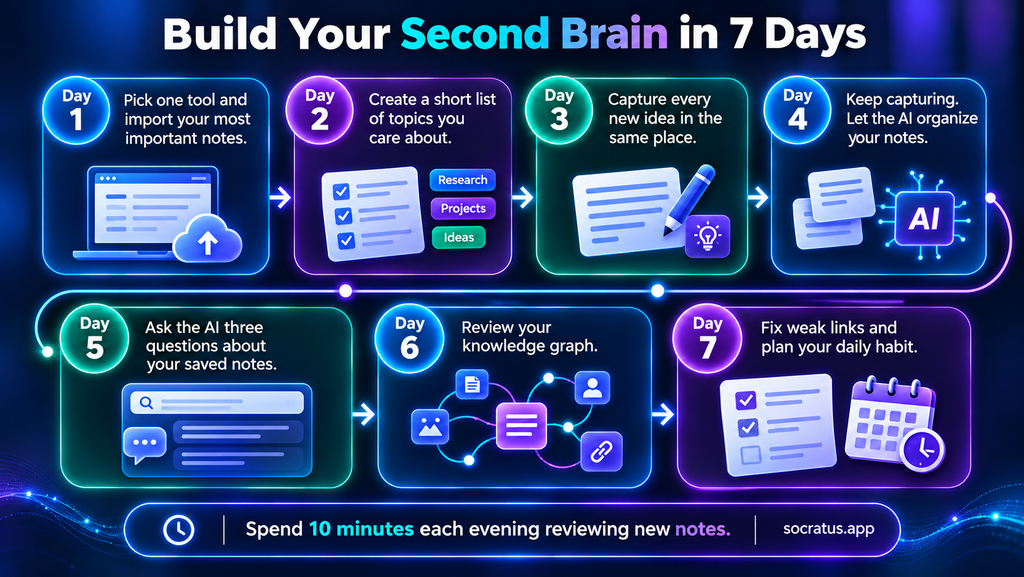
You do not need a complex setup to use AI knowledge management tools. Follow this simple plan.
- Day one: Pick one of the AI knowledge management tools and import your most important notes.
- Day two: Create a short list of topics you care about.
- Days three and four: Capture every new idea in the same place.
- Day five: Ask the AI three questions about your saved notes.
- Days six and seven: Review the graph and fix weak links.
After one week, you will notice a pattern. You search less and think more. Additionally, small daily habits matter more than big setups. Spend ten minutes each evening to review new notes. Over time, your system grows smarter, because every new note adds context to old ones.
Privacy, Accuracy, and Trust in AI Knowledge Management Tools
It is a matter of trust that will determine if you continue with an AI knowledge management tool. For that reason, it is worth looking into where your data is being held. You have the option of local storage to keep files on the device or cloud storage to put them on a server; either way works, but one should be aware of the distinction.
Then there is the question of accuracy. Put the tool to the test by posing some questions to which you are already privy to the answer. Should it come back with the wrong response, change your approach to note taking. The AI will pick up on the context better if you use full sentences and unambiguous titles. And do not forget to make regular backups of your notes. A weekly export is an easy way to safeguard a good deal of work.
Common Mistakes When Using AI Knowledge Management Tools
One sees the same kind of missteps from novices when it comes to AI knowledge management. For a start, they will hoard information and do little in the way of review. Then there is the tendency to put blind faith in an AI’s output without looking at the source. And often they are on to a new tool by the next month. Such errors only impede one’s progress. The better course is to be selective about what is saved, to confirm any answer of consequence and make do with a single system.
Do not forget that while AI is an aid to your thinking, it is not a substitute for it. In the end, you are the one who must determine what is of value and what is true; human judgment is what ensures the accuracy of your knowledge.
FAQs About AI Knowledge Management Tools
1. What are AI knowledge management tools?
AI knowledge management tools are apps that read, organize, and connect your notes. They also answer questions about your notes in plain language.
2. How do AI knowledge management tools differ from regular note apps?
Regular note apps store text and rely on keyword search. AI knowledge management tools understand meaning, link related notes, and give direct answers.
3. Are AI knowledge management tools safe for private notes?
Safety depends on the tool. Local-first tools keep your notes on your device. Always read the privacy policy before you upload personal files.
4. Who should use AI knowledge management tools?
Students, researchers, writers, developers, and teams gain the most. Anyone with many notes and little time to search can benefit.
5. How long does it take to see results with AI knowledge management tools?
Many people notice faster searching within the first week. Daily capture and a short evening review speed up the results.
Final Thoughts on AI Knowledge Management Tools
The value of a note is in its utility. With AI knowledge management, you can make that happen by transforming a jumble of files into something connected and easy to find. These tools will record an idea on the spot, put related thoughts in context and put answers to questions in plain terms. In time, your second brain gets better for it.
Make a point to select one tool this week and get started. Put in some notes and put the system to the test with a few queries. Establish a ten-minute review as part of your day. You will find that as you put in the work, there is less time spent in search and more for creation.
Ultimately, a good system should be an aid to your thinking, not a substitute for it. Go with something straightforward that has your privacy in mind and can justify its responses. Do not worry about being perfect; consistency is what counts. Every bit of organization you do now is a favour to your future self. Take one idea and let the software handle the rest.