Personal Knowledge Management with AI: How to Build a Second Brain That Connects Your Notes
You read a sharp article on Monday. By Thursday, the key idea has vanished. Sound familiar? Most of us save plenty of information but struggle to find it again. Folders pile up. Tags multiply. Notes sit in separate corners, and nobody revisits them. Meanwhile, the ideas you need most stay buried.
Personal knowledge management solves this problem. It gives you a simple system to capture ideas, connect them, and use them when work demands answers. Better still, AI now handles much of the heavy lifting, so your notes can link themselves.
This guide explains how the process works, step by step. You will learn the core methods behind a second brain. Then you will see how AI changes the game and get a practical plan to start this week. Grab a coffee, and let’s build something that remembers for you.
What Personal Knowledge Management Means for You
Personal knowledge management (PKM) is the process of collecting, storing and re-using knowledge. It is a new field that emerged with the rise of the knowledge worker, or someone who works with ideas and needs a personal version of the knowledge management systems found in many companies.
Personal knowledge management is like an external hard drive for your mind. Your brain is amazing at coming up with ideas and concepts, but it is not great at storing that information. By having an effective personal knowledge management system, your brain can focus on the thinking part, while your system stores all the important details.
PKM has many benefits. When you store knowledge effectively, you can find information in seconds instead of minutes. You can avoid duplicating your research. You can also make better decisions, since you can leverage all the knowledge you’ve collected when working on a new project. Personal knowledge management is a habit that, when practiced for months, can transform all your reading and learning into an asset.
The main figure in the PKM space is productivity expert Tiago Forte. He first publicly shared his PKM method, called Building a Second Brain, in 2017, and wrote a book about it in 2022. His main advice is to capture the information that resonates with you and then use it.
Why Folders and Tags Fall Short
Folders work well until you begin to accumulate many notes. Then with each new note you write, you must decide which folder does it belong in. And in many cases, it may fit in two folders.
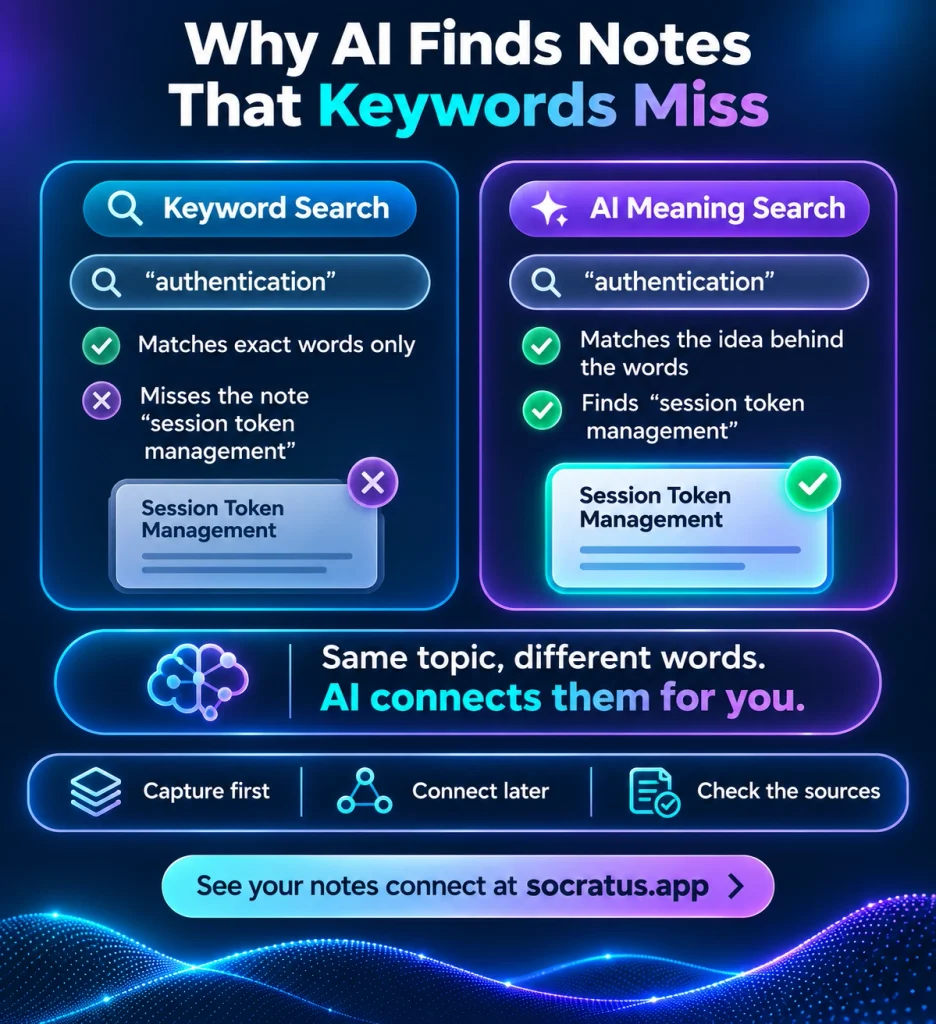
Tags are helpful, but they rely on your memory. Say you search for “authentication,” but the note you wrote on “session token management” doesn’t show up in your search. They are both about the same thing, but the keyword search can’t tell that. A keyword search is looking for a string of letters, not for meaning.
Linking notes manually is an even higher demand on the user. You have to think about where each note goes, what other notes to link it to, etc. If you are busy, you may not do this. Zettelkasten writers have already pointed this out, in fact. If you keep a note box but don’t link your notes, you end up with a typical archive that is hard to search through.
Two Proven Methods Behind Every Good Second Brain
Two methods dominate the conversation, and each solves a different problem.
- The CODE and PARA approach: Forte’s CODE stands for Capture, Organize, Distill, and Express. The PARA system organizes notes in relation to how actionable they are: Projects, Areas, Resources, and Archives. You always know where to file a note, because you only need to ask yourself one question: Is this something I can act on right now?
- The Zettelkasten approach: The German word for slip box. In this case, each note contains one idea and is linked to other notes with similar ideas. As you add more links, you end up with a network of connections that makes for some surprising links. The act of linking is the key to this process. Advocates of the method say that linking notes is very similar to how the human brain makes connections between ideas, and that once you’ve been using it for a few weeks, it becomes second nature.
But which one should you use? Many authors use both. Use a second brain to organize things by action, and use a Zettelkasten to focus on connections between ideas. You can have one inside the other. Use the PARA system to keep your projects organized, and use small, connected notes to develop your thinking.
How AI Is Changing Personal Knowledge Management
Here is where things get exciting. AI removes the hardest part of the process: making connections by hand.
- Meaning-based matching: Modern tools turn your notes into numbers that represent meaning. Those numbers let software find semantic relationships between notes, even when the words differ.
- Smarter search: Search for “scaling databases for busy apps,” and you can surface a note titled “handling traffic spikes.” This approach upgrades information retrieval from matching words to matching ideas.
- Capture first, connect later: Developers who build these tools describe a clear shift. Connections appear exactly when you need them. You skip the filing chores and still end up with a web of linked thoughts.
- Plain-English questions: An AI knowledge system lets you ask questions in plain English. The answer comes from your own notes, and good tools show their sources. You can check each claim instead of trusting a guess.
- Surprise links: The payoff is knowledge discovery. A “similar notes” view or a visual graph can reveal links you never planned. A customer interview from March might explain a problem you face in November.
- A quick example: Imagine a marketer who saves webinar notes, survey results, and ad reports for a year. She asks, “Which message got the best response?” The system lists related notes from all three places side by side. She spends two minutes instead of two hours.
- Connected assistants: Tools now link with outside AI assistants through open standards such as the Model Context Protocol. That link lets an assistant read your notes as live context. Check what each tool can access before you connect it.
Build Your Personal Knowledge Management System in Five Steps
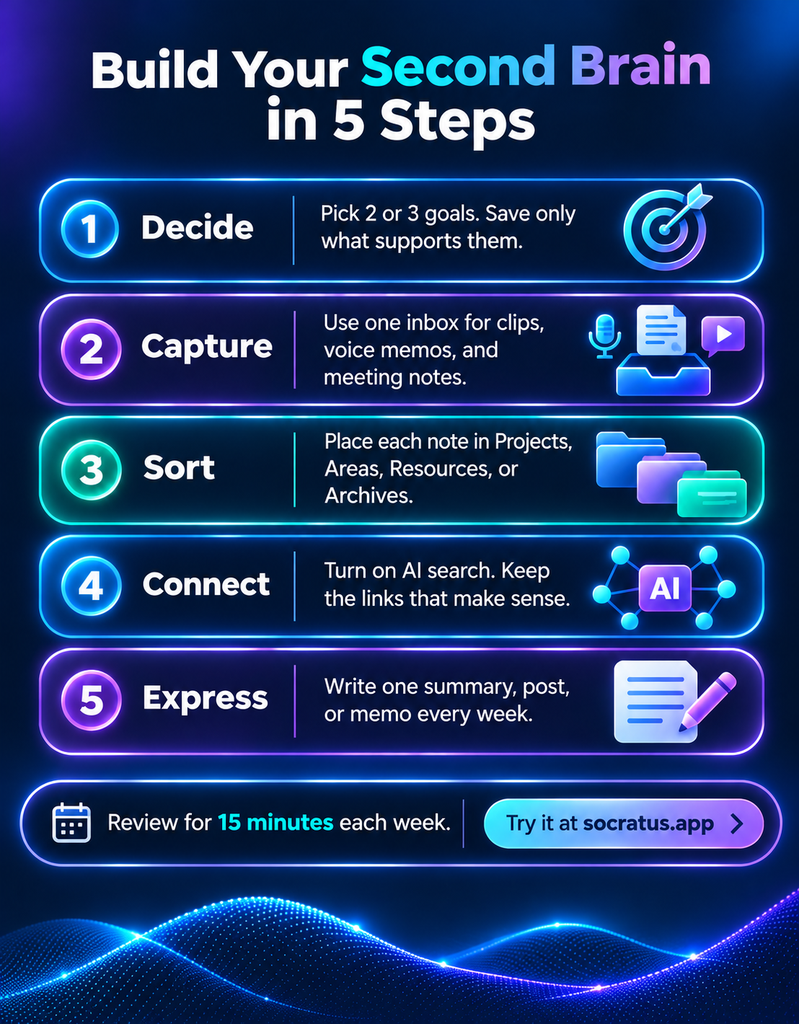
You can start small. One expert guide advises you to begin with an app you already use, because structure matters more than software. Follow these five simple steps.
- Decide what deserves capture: Write down two or three goals. Save only what supports them.
- Capture fast: Use one inbox for web clips, voice memos, and meeting notes. Speed beats polish at this stage.
- Sort by action: Move each note into Projects, Areas, Resources, or Archives. Give every note about a minute.
- Let AI connect the dots: Turn on semantic search and related-note suggestions. Review the links it proposes and keep the useful ones.
- Express something every week: Write a short summary, a post, or a decision memo. Output proves your notes work. Even a three-line summary counts.
Add a 15-minute weekly review. Skim new notes, merge duplicates, and archive finished projects. This habit keeps your personal knowledge management system light.
Where Socratus Fits in Your Workflow
If you’re looking for a ready-made second brain app, Socratus is worth checking out. On its website, it is described as an intelligent second brain for connected thinking, connecting related notes by meaning rather than just keyword, and allowing you to view all these connections in an interactive graph. You can also chat with an AI, which will respond based on your own documents, and run Python in your notes. Your notes are stored locally on your device, so you can keep your data in your own hands. Socratus has apps for Windows, macOS, iOS, and Android.
Give it a go. Import ten notes from a project and use its graph to see what you can find that you didn’t realize was related. Socratus will no doubt have new features by the time you read this, so look at their site for details. And of course, you can use this same approach to any tool in your personal knowledge management toolkit, just make sure it helps you find and make use of your ideas faster. If it does, it’s a good tool for your toolkit.
A Thesis Story: From Scattered Notes to a Finished Chapter
This story is illustrative. It shows a common research scenario, not a real customer.
Sana is a master’s student who is three months away from her deadline for writing her thesis. She has a pile of 120 papers she saved; she has taken voice notes of every meeting with her supervisors; she has a folder of miscellaneous stuff. She is spending every evening looking for a single quote she has written down. It cost her 40 minutes of her time last Tuesday.
Sana uploads her notes to Socratus and opens the graph. It contains a visual map of her notes. All her notes are connected, and she is surprised to find that some papers she saved in March are connected to a note she wrote in October during a meeting with her supervisor. They both refer to a hole in her argument. She didn’t make the connection, but Socratus has, by the content of the two notes.
Sana uses the AI to ask a simple question about her notes: “What do my sources say about sample size?” The AI answers the question using her documents. Sana can go into her notes and see the relevant points on her own.
Sana is also using Socratus to analyse her data. She writes a small python snippet that runs in her notes and can keep her analysis and her reasoning in the same place.
Two weeks later, Sana writes the methods section of her thesis in a single weekend. She always had the information; she just had to organise it.
Sana didn’t change her habits. Socratus helped her organise the mess. Why don’t you give it a try with your project? Import your notes and use the graph and AI.
Common Mistakes That Slow Your Second Brain
Even a strong system can stall. Most problems come from habits, not software. Watch for these traps.
- Hoarding without reading: One Zettelkasten forum member admitted to saving every link and processing none. Collecting feels productive, but understanding is the goal.
- Lazy links: Linking every note to every other note creates noise. Choose connections with intention, and review AI suggestions before you accept them.
- Tool hopping: New apps tempt everyone. Pick one home for your notes and improve your habits first.
- Trusting AI blindly: AI suggestions save time, yet you remain the editor. Open the source note, confirm the link makes sense, and correct anything that looks off.
- Skipping the express step: Notes that never become output slowly lose value.
Personal Knowledge Management FAQs
What is personal knowledge management?
It is the habit of capturing, organizing, and reusing what you learn, so your ideas stay useful over time.
Do I need to link my notes by hand?
No. AI can suggest links by meaning. You review them and keep the ones that fit.
How does a second brain differ from regular note-taking?
Regular notes store information. A second brain also connects your notes and helps you find them again.
Does Socratus keep my notes private?
According to its website, Socratus stores notes locally on your device and supports encryption through QEncrypt.
Where should a beginner start?
Pick one project, import ten notes, and ask the AI one real question about them.
Start Your Personal Knowledge Management Habit Today
A strong second brain does not need perfect folders or a weekend of setup. It needs a clear purpose, a steady capture habit, and a helper that spots link you would miss. Personal knowledge management rewards small, consistent steps.
Start with the five steps above. Capture for one week. Sort your notes by action. Then let AI show you the hidden connections. Old ideas often become useful again, and new ideas arrive faster.
Remember the goal. You want a system that supports your thinking, not one that demands constant care. Keep it simple, review it weekly, and trust the process. Small wins build momentum, and momentum builds a system you enjoy using.
Ready to see your notes connect? Visit socratus.app, load a few notes, and explore your own knowledge graph. Your future self will thank you for starting now.